

Best Order Management Solution for Distributors: A Complete 2027 Buyer’s…
13 Nov, 2026
Summary Choosing the right order management solution helps distributors organize...
Updated: 13th November, 2026
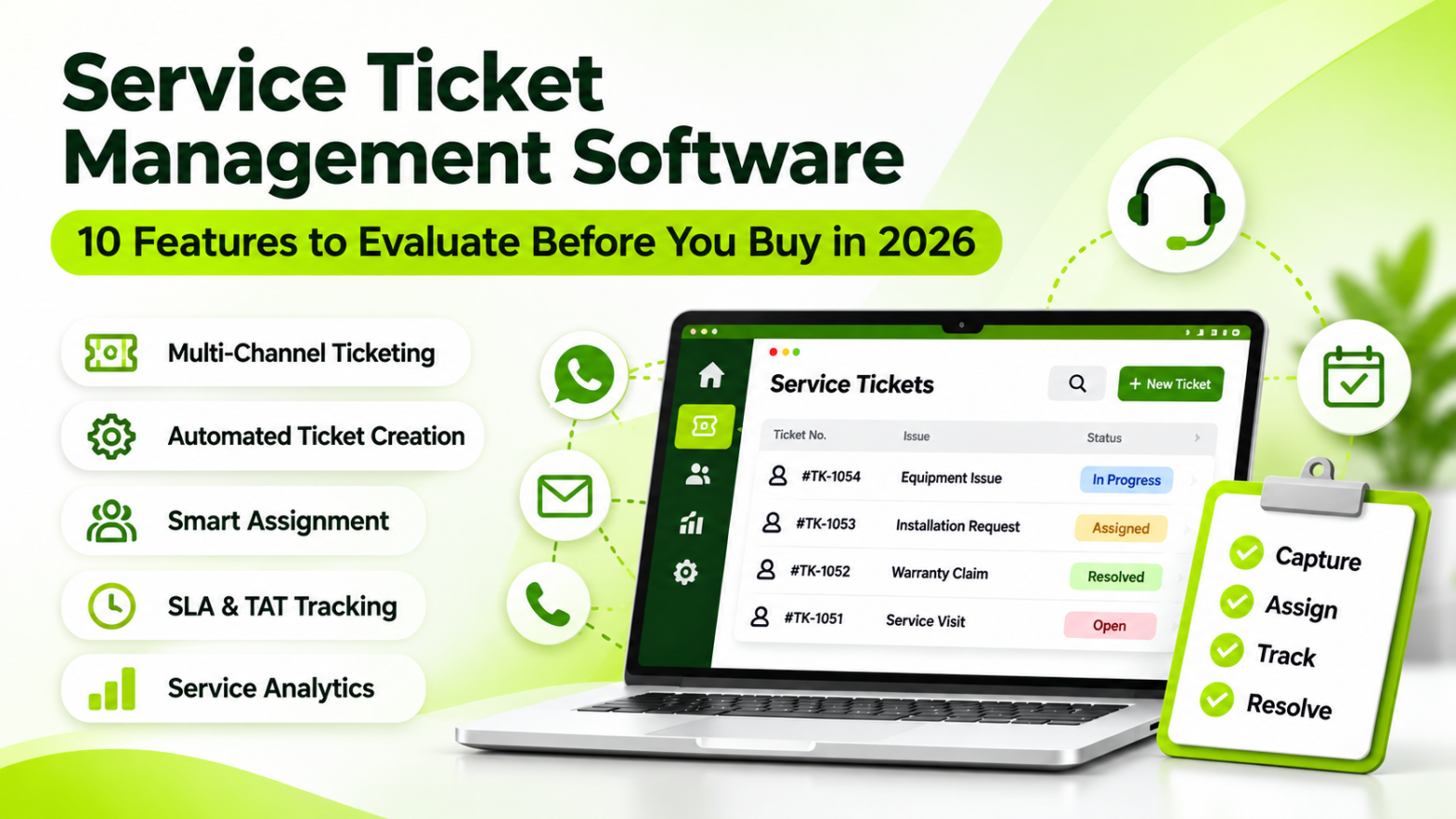
A customer reports a machine breakdown on WhatsApp. Another customer calls about a pending warranty issue. Meanwhile, a third customer is waiting for an update on a service request raised last week.
Your service team is responding to everyone, but can you confidently identify which requests are pending, who owns them, and whether they are being resolved within the promised time?
This is the operational challenge that Service Ticket Management is designed to solve.
For manufacturers, distributors, equipment suppliers, and service-based businesses, customer support does not end after a product is sold. Installation queries, technical complaints, warranty requests, maintenance visits, and replacement requirements continue throughout the customer lifecycle.
Managing these activities through spreadsheets, personal messages, and disconnected communication channels makes service operations difficult to control.
A structured Service Ticket Management system brings customer requests into one shared workflow, where teams can capture issues, assign ownership, monitor progress, and maintain service history.
Customer service problems often begin with small process gaps.
A complaint is received but not recorded. A technician is informed but not assigned a deadline. A customer calls again because nobody has shared an update. Eventually, managers have to investigate the issue manually.
These problems become more frequent when service requests increase.
Customers may contact a business through phone calls, email, WhatsApp, social media, or website forms. When these conversations remain separate, service teams struggle to maintain a complete record.
Service Ticket Management centralises requests into a shared service queue, helping teams maintain visibility across customer interactions.
Businesses can also explore automated ticket creation to understand how incoming requests can become structured service records.
When multiple employees handle customer complaints, responsibility can become unclear.
A ticket management workflow establishes who is responsible for each request, making assignment and follow-up easier to monitor.
Customers expect acknowledgement and meaningful progress updates. When service teams cannot communicate the status of a request, customers are more likely to follow up repeatedly.
Automated communication through WhatsApp service notifications can help keep customers informed about ticket acknowledgement and status changes.
Without consolidated reporting, managers may struggle to identify pending tickets, overdue requests, workload distribution, and recurring service issues.
A centralised service dashboard helps management move from manual checking to more informed operational decisions.
Not every ticketing platform offers the same capabilities. Before choosing a solution, evaluate the features against your service team’s actual workflow.
Your customers should not have to follow one specific communication channel to report an issue.
Look for software that can capture service requests from channels such as:
A unified service queue makes it easier to maintain request visibility and reduces dependence on individual employees’ inboxes.
Groweon Care supports multi-channel ticket generation and centralised service request handling. Explore its service ticket management capabilities to understand how requests can enter a common workflow.
Manually recording every complaint increases administrative work and creates opportunities for errors.
A good Service Ticket Management platform should support automated ticket creation through configured channels and forms.
It should also help teams categorise requests according to their nature, such as:
Proper categorisation helps teams identify the type of support required before assigning the ticket.
See how automated ticket workflows can help organise incoming customer requests.
A ticket should never remain unattended because employees are unsure who should handle it.
Evaluate whether the software supports assignment rules, responsible users, team allocation, and ticket assignment alerts.
For example, a technical complaint can be assigned to the technical support team, while a warranty-related request can be directed to the employee responsible for warranty coordination.
The goal is to establish clear ownership from ticket creation to closure.
Not all service requests have the same urgency.
A critical equipment failure may require immediate attention, while a routine information request can follow a standard response process.
Service Ticket Management software should help teams:
SLA tracking is especially important for businesses that have formal service commitments with customers.
For additional context, ITSM automation trends highlight the growing role of automated triage, routing, and service workflows.
Customers should not need to call your service team repeatedly to understand whether their issue has been acknowledged or resolved.
Look for automated notifications for:
Groweon supports email and WhatsApp notifications for service ticket communication. Businesses can review its automated WhatsApp notifications for relevant workflows.
A ticket should provide more than a complaint description.
The service team may need to review customer details, previous interactions, earlier complaints, and related service records before taking action.
A centralised history helps employees understand the customer’s situation without repeatedly asking for the same information.
This is particularly useful for businesses that manage repeat service requests, product warranties, and ongoing customer relationships through connected CRM records.
Service employees and technicians may not always work from an office.
Mobile accessibility helps authorised users review assigned requests, check relevant information, and update service progress while working outside the workplace.
When evaluating a platform, check its mobile capabilities and whether the relevant ticket workflows are available to your field teams.
Businesses selling equipment, machinery, electronics, and other products often handle service requests under warranty or Annual Maintenance Contracts.
Their ticketing workflow may need to connect with contract details, renewal information, and scheduled maintenance activities.
For example, before processing a service request, the team may need to verify whether the customer’s equipment is covered by an active contract.
Groweon’s AMC warranty management capabilities can support businesses looking to coordinate contract-related and after-sales workflows.
A service management system should help managers understand how the support operation is performing.
Important reporting capabilities include:
These reports help identify recurring issues, workload imbalances, and areas where service processes need improvement.
Every business follows a different service process.
An equipment manufacturer may require technical inspection and spare-part replacement stages, while a distributor may focus on complaint registration, approval, and resolution.
Evaluate whether the system supports configurable ticket statuses, assignment workflows, forms, permissions, and escalation rules.
The platform should be able to support increasing ticket volumes and additional service users without forcing the business to rebuild its entire process.
Many businesses start with spreadsheets, email folders, and WhatsApp groups. These methods may work when service requests are limited, but they become harder to manage as the customer base expands.
|
|---|
The difference is not simply digital versus manual recordkeeping. It is the ability to manage the entire service request lifecycle with clear ownership and visibility.
Before comparing vendors, document how your service team currently works. This helps you evaluate software based on operational requirements rather than a long list of features.
|
|---|
A product demonstration should show how the platform handles your real service scenarios.
Ask the vendor:
Also ask for a demonstration using an actual complaint, from the first customer message to final ticket closure.
For businesses evaluating a dedicated service ticketing solution, Groweon Care brings ticket capture, assignment, communication, SLA tracking, and service visibility into one operational workspace.
Instead of managing customer requests across disconnected tools, teams can follow a structured process.
Groweon Care supports multi-channel ticket generation, instant acknowledgement, custom ticket creation forms, and interaction history.
Businesses can also provide customers with an online ticket creation link, making it easier to submit requests without relying entirely on direct phone communication.
Explore Groweon ticket creation to understand these workflows.
Once a request is created, teams need to know who is responsible for it and how urgently it should be handled.
Groweon Care supports smart categorisation, ticket assignment, SLA tracking, TAT management, and ticket escalation workflows.
These capabilities help managers monitor service progress and identify tickets that require attention.
Service communication should continue after ticket creation.
Groweon Care supports ticket acknowledgement, progress notifications, closure updates, and feedback communication through email and WhatsApp.
Businesses can review Groweon service workflows to see how these capabilities fit together.
Managers need visibility into ticket progress and service team activity.
Groweon Care provides dashboards and reporting capabilities covering ticket progress, month-on-month ticket trends, user activity, and service performance.
For businesses managing recurring maintenance, its AMC management workflows can also help coordinate contract-related service activities.
Service ticketing often works alongside other business operations.
For example, a customer complaint may require a service visit, spare-part replacement, warranty verification, or a follow-up communication.
Groweon’s wider CRM and business platform supports connected customer and operational workflows. Businesses can evaluate the relevant modules and integrations according to their requirements.
The broader technology landscape is moving towards more connected service operations. Research such as the HCL technology trends report discusses automation and intelligent service delivery as emerging operational priorities.
Buying software is only the first step. Businesses should also measure whether the new system is improving service operations.
Track these metrics before and after implementation:
|
|---|
Do not measure performance using ticket closure volume alone. Closing tickets quickly is not necessarily the same as resolving customer problems correctly.
For further context on service automation and workflow integration, explore the Kaseya automation report and the SolarWinds service report.
For a business handling only a few service requests every month, a basic manual process may be sufficient.
However, when multiple employees, communication channels, service locations, and customer contracts are involved, the cost of manual coordination can become significant.
Consider a business receiving 300 service requests every month. If employees spend even five minutes manually recording, forwarding, and checking each request, that represents 25 hours of administrative effort monthly.
A structured Service Ticket Management system can reduce repetitive coordination through automated creation, assignment, notifications, and reporting.
The actual savings depend on ticket volume, workflow design, employee adoption, and the capabilities of the selected platform.
Before investing, compare the software cost with the time spent on manual administration, missed follow-ups, delayed resolutions, and customer escalations.
Service Ticket Management is particularly relevant to businesses where customer relationships continue after a product or service has been sold.
Examples include:
The right platform should reflect the service lifecycle of the business rather than forcing every organisation into the same workflow.
1. What is Service Ticket Management?
Service Ticket Management is the process of capturing, categorising, assigning, tracking, and resolving customer service requests through a structured ticketing workflow.
2. What is Service Ticket Management software?
Service Ticket Management software is a digital platform that helps businesses organise customer complaints and service requests, assign responsibility, monitor resolution progress, and maintain service records.
3. What features should Service Ticket Management software include?
Important features include multi-channel ticket creation, automated categorisation, ticket assignment, priority management, SLA and TAT tracking, customer notifications, service history, and reporting.
4. How does automated ticket assignment work?
Automated ticket assignment uses predefined rules to route incoming requests to the appropriate employee or service team based on categories, responsibilities, or other configured conditions.
5. How does SLA tracking improve customer service?
SLA tracking helps businesses monitor response and resolution commitments, identify overdue requests, and trigger escalation alerts when configured deadlines require attention.
6. Can Service Ticket Management software handle AMC and warranty requests?
Yes, platforms with relevant AMC and warranty capabilities can connect service requests with contract information, coverage details, scheduled maintenance, and renewal activities. Always verify the supported workflows before purchasing.
7. Can customers create service tickets online?
Yes. Some platforms provide online ticket creation forms or web links through which customers can submit service requests and share the information required by the support team.
8. What is the difference between a help desk and Service Ticket Management?
A help desk refers to the broader customer support function. Service Ticket Management is the structured process of recording, assigning, tracking, and resolving individual support requests within that function.
Customer service becomes difficult to manage when requests, responsibilities, deadlines, and communication remain scattered across different tools.
Service Ticket Management brings these activities into a structured process, helping businesses capture every request, establish ownership, monitor resolution timelines, and maintain customer visibility.
When evaluating Service Ticket Management software, look beyond basic ticket creation. Prioritise automation, SLA tracking, customer communication, service history, reporting, and the ability to support your after-sales operations.
If your team is still depending on manual follow-ups and disconnected complaint records, it may be time to move towards a more organised service operation.
Explore Groweon Care Service Management and book a free demo to see how its service ticket workflows can support your business.

13 Nov, 2026
Summary Choosing the right order management solution helps distributors organize...

13 Nov, 2026
Summary Service Ticket Management helps businesses capture, assign, track, and...
13 Nov, 2026
Summary Choosing the right inventory management software can help businesses...

12 Nov, 2026
Summary AI CRM Software helps businesses manage customer relationships through...

12 Nov, 2026
Summary Pharmaceutical companies manage complex relationships with doctors, medical representatives,...