

10 Must-Have Features in AI CRM Software for Modern Businesses
12 Nov, 2026
Summary AI CRM Software helps businesses manage customer relationships through...
Updated: 11th November, 2026
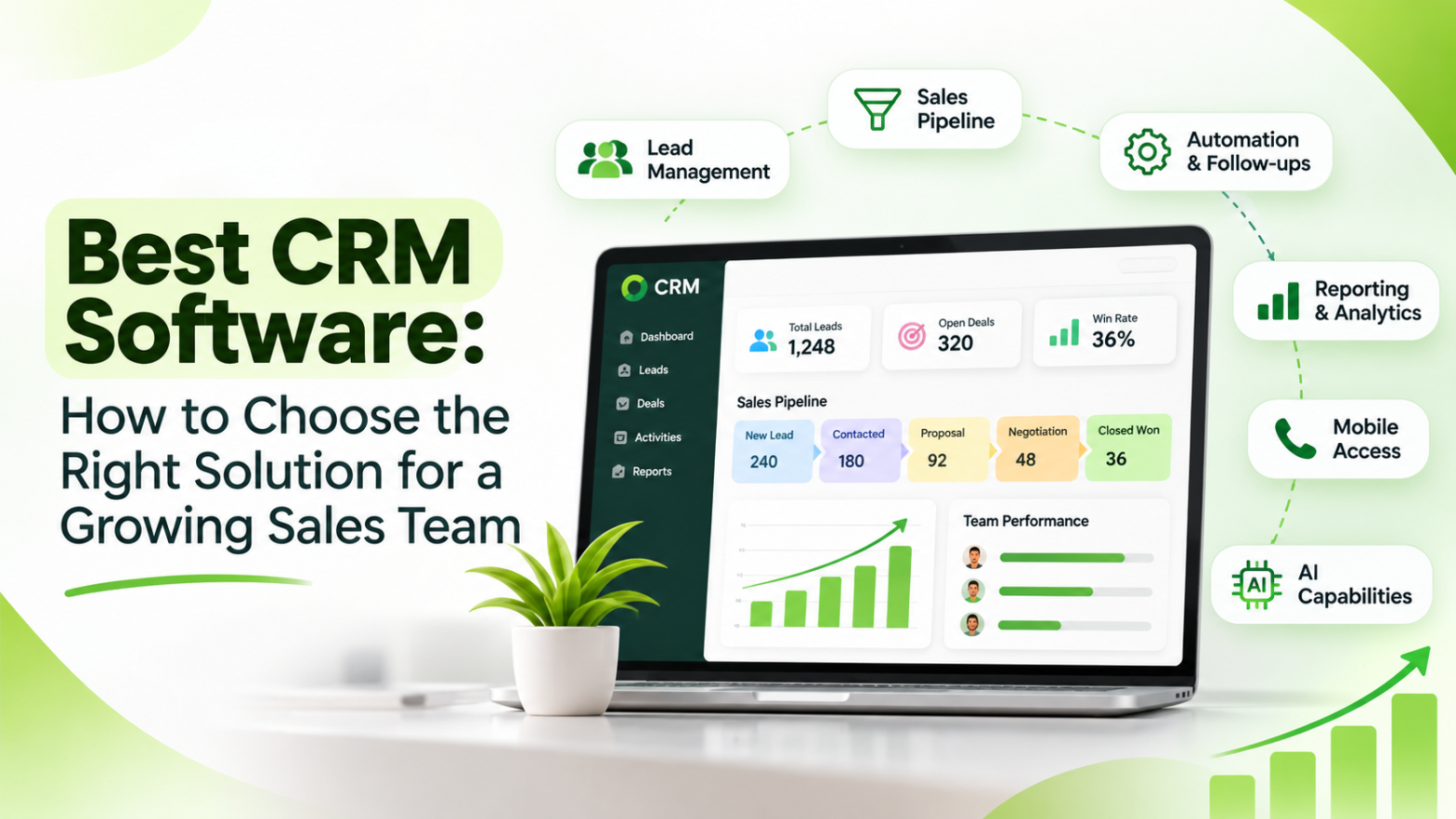
Choosing the best CRM software becomes essential when a growing sales team starts managing more leads, customers, and sales opportunities.
The right CRM helps businesses centralize customer information, organize sales pipelines, automate repetitive tasks, and improve team productivity.
Before selecting a CRM, businesses should evaluate its usability, lead management, automation, reporting, integrations, scalability, and security.
This guide explains how to identify CRM software that supports current sales operations while preparing a business for future growth.
As a business grows, managing customer relationships becomes increasingly complex. More sales representatives mean more enquiries, customer conversations, follow-ups, meetings, and opportunities to track. What initially works through spreadsheets and manual records may become inefficient when the sales team expands.
Sales managers need visibility into individual performance, business owners need reliable sales reports, and representatives need quick access to accurate customer information. Without a structured system, important enquiries can be overlooked, communication can become inconsistent, and sales opportunities may remain unattended.
This is why choosing the best CRM software is an important business decision. A suitable Customer Relationship Management system brings customer information, sales activities, and communication records together in one platform.
According to Salesforce CRM, CRM technology helps organizations manage customer relationships and interactions throughout the customer lifecycle. However, selecting the right solution requires understanding the specific requirements of your business rather than simply choosing software with the longest feature list.
A growing sales team needs a structured process to manage enquiries, assign responsibilities, monitor opportunities, and maintain customer relationships.
When businesses depend on disconnected tools, employees may spend more time searching for information and preparing reports than engaging with customers.
The best CRM software helps address these challenges through centralized customer records, sales pipeline management, task automation, and performance reporting.
A well-organized CRM environment can help businesses:
Businesses can also explore CRM fundamentals to understand how customer relationship management supports organizational processes.
For growing companies, CRM should not be treated merely as a contact database. It should become part of the overall sales management strategy.
Not every CRM platform provides the same capabilities. Some focus primarily on contact management, while others offer sales automation, AI capabilities, customer communication, and advanced reporting.
The right combination depends on the business model, sales process, and team structure.
Lead management is one of the most important features of the best CRM software.
Businesses generate leads through websites, digital advertisements, social media, referrals, online marketplaces, and direct enquiries. When these enquiries are stored in different systems, sales representatives may struggle to maintain complete records.
A CRM should support:
Centralized lead management helps representatives understand their responsibilities and allows managers to monitor the progress of incoming enquiries.
Businesses can explore lead management capabilities to understand how a structured process can improve sales coordination.
For additional guidance, HubSpot CRM provides an overview of customer relationship management tools and their role in organizing business information.
A growing sales team needs visibility into every active opportunity.
Sales pipeline management organizes prospects according to their position in the buying journey. Instead of relying on individual spreadsheets, representatives and managers can review opportunities through clearly defined stages.
A typical sales pipeline may include:
Businesses should be able to customize these stages according to their sales process.
A structured pipeline helps managers identify delayed opportunities, understand conversion performance, and determine which deals require attention.
For further understanding, Microsoft Dynamics 365 offers information about sales management and business relationship solutions.
Manual follow-ups become increasingly difficult when representatives manage a large number of opportunities.
The best CRM software should provide automation capabilities that reduce repetitive administrative work and support consistent sales processes.
Useful automation features include:
For example, when a new enquiry is assigned to a representative, the CRM can create a follow-up task based on the configured workflow.
Automation should make sales activities more consistent without removing the importance of personal customer communication.
Businesses can explore workflow automation concepts to understand how repetitive processes can be streamlined.
Sales representatives communicate with prospects through calls, emails, meetings, and messaging applications.
When these conversations are scattered across different platforms, employees may not know what was previously discussed with a customer.
A CRM should help maintain relevant communication records, including calls, notes, emails, messages, and meeting activities where supported.
This helps representatives continue conversations with better context and reduces repeated questions.
For businesses that rely on messaging, WhatsApp Business is another important communication platform to evaluate when planning CRM integrations.
Groweon businesses can also explore AI WhatsApp Writer for AI-assisted message creation capabilities.
A growing sales team requires more than individual activity records. Managers need reliable reports to understand the performance of the overall sales operation.
A CRM should provide reporting capabilities such as:
These reports help managers identify performance gaps and make informed decisions.
For example, if a team generates many enquiries but converts very few into demonstrations, management can investigate lead quality, response times, and the initial sales process.
Businesses can strengthen their reporting strategy by understanding Google Analytics and its approach to measuring digital performance.
For additional business intelligence insights, Microsoft Power BI provides information about data visualization and reporting.
Sales representatives are not always working from an office. Field sales teams, business development executives, and regional representatives may need customer information while travelling or visiting clients.
A mobile CRM application can help employees:
Mobile access helps maintain continuity between office-based and field-based sales operations.
Businesses should evaluate mobile usability, supported devices, offline capabilities where required, and application security.
Explore Groweon Lite and its mobile CRM capabilities when assessing mobile sales management requirements.
A CRM should fit into the existing technology environment of a business.
Depending on operational requirements, useful integrations may include:
Integrations can reduce duplicate data entry and improve information flow between departments.
Before purchasing CRM software, verify which integrations are available, whether they require additional charges, and whether they support the required workflows.
For example, Google Workspace provides productivity and collaboration tools that businesses may need to consider when planning their software ecosystem.
Businesses can also explore Zoho CRM to understand the range of CRM and business automation capabilities available in the market.
Artificial Intelligence is expanding the capabilities of modern CRM systems.
Depending on the platform, AI features may support lead analysis, communication assistance, workflow recommendations, and sales insights.
Examples include:
AI should complement sales representatives rather than make unsupported decisions about customers.
Businesses should evaluate how AI features work, what information they use, how outputs are reviewed, and whether the capabilities address genuine operational problems.
For a broader understanding of AI, Google AI and Microsoft AI provide information about AI technologies and business applications.
Groweon’s AION Autopilot and AION AI+ represent its approach to bringing AI-powered capabilities into business and sales workflows.
As sales teams expand, businesses need to manage multiple users, departments, managers, and reporting structures.
A suitable CRM should provide appropriate user roles and access permissions.
For example, sales representatives may need access to their assigned leads, while managers may require visibility into team performance.
Access controls help businesses organize responsibilities and protect customer information.
Businesses should also understand NIST security guidance when evaluating technology security practices.
A CRM that works for a five-person team should also be capable of supporting future business requirements.
Businesses should evaluate:
Security should be evaluated alongside functionality.
Businesses should review the provider’s security documentation, contractual commitments, data handling practices, and applicable compliance requirements.
Relevant frameworks and guidance include ISO security standards, GDPR information, and India’s MeitY resources.
Selecting a CRM based only on its feature list can lead to unnecessary costs and poor adoption.
A more practical approach is to evaluate the software against the actual sales workflow.
Map how a lead moves through the organization.
Identify how enquiries are received, assigned, contacted, qualified, followed up, and converted.
This helps determine which CRM features are essential and which are optional.
Businesses can use process mapping principles to document their existing workflows before implementation.
List the challenges that the sales team currently experiences.
For example:
The CRM should address these specific problems rather than introduce unnecessary complexity.
CRM pricing can vary depending on the number of users, selected features, automation limits, integrations, and support requirements.
Businesses should compare the total cost rather than only the advertised starting price.
Consider:
A reasonably priced CRM that the team actually uses can deliver more value than an expensive platform with unnecessary complexity.
A product demonstration helps businesses understand how the software works in real situations.
Instead of watching only a general presentation, ask the provider to demonstrate specific workflows.
For example, show how a new lead is captured, assigned, followed up, converted, and reported.
Before deploying CRM software across the organization, consider testing it with a smaller group.
Evaluate whether representatives can use the platform comfortably and whether managers receive the information they need.
Collect feedback and identify workflow changes before expanding implementation.
Use this checklist when comparing CRM platforms.
The best choice is not necessarily the CRM with the most features. It is the one that fits the team’s requirements and supports consistent adoption. Common Mistakes to Avoid When Choosing CRM SoftwareSelecting Software Based Only on PriceA low subscription cost may seem attractive, but missing features, additional integration charges, or limited support can increase the overall cost. Evaluate the total investment and expected business value. Choosing Too Many FeaturesA platform with extensive capabilities can become difficult to use if the team does not need them. Prioritize features that solve existing business problems. Ignoring Employee AdoptionEven a technically advanced CRM can fail if sales representatives find it confusing or time-consuming. Involve the team in the selection process and provide practical training. Not Planning CRM ImplementationBusinesses should define ownership, data migration requirements, workflow stages, and reporting expectations before implementation. A clear rollout plan helps avoid confusion and incomplete records. Failing to Review CRM PerformanceCRM adoption should be reviewed regularly. Monitor usage, follow-up completion, sales pipeline visibility, and improvements in the processes the CRM was intended to support. How Groweon CRM Supports Growing Sales TeamsGroweon CRM is designed to help businesses organize leads, manage sales activities, and maintain customer information through a centralized platform. For growing sales teams, relevant capabilities include lead management, sales tracking, follow-up workflows, communication management, and reporting. Businesses can explore these Groweon solutions:
The right configuration depends on the organization’s sales process, team structure, integrations, and operational requirements. How to Measure the Success of Your CRM InvestmentChoosing and implementing CRM software is only the beginning. Businesses should measure whether the platform is improving sales operations. Important performance indicators include: Lead response time: Measures how quickly the sales team responds to new enquiries. Follow-up completion rate: Shows whether assigned follow-up activities are being completed. Lead-to-customer conversion rate: Measures the proportion of leads that become customers. Sales cycle length: Tracks the time taken to move opportunities from initial contact to closure. Pipeline value: Shows the value of active sales opportunities. CRM adoption rate: Helps determine whether representatives are regularly using the system and updating records. Businesses can also explore SaaS metrics to understand how technology investments and business performance can be evaluated. These metrics should be compared against a reliable baseline. Businesses can then identify whether CRM implementation is improving their sales processes over time. The Future of CRM Software for Growing Sales TeamsCRM technology is moving beyond basic contact management and sales record keeping. Cloud-based platforms, mobile applications, workflow automation, and Artificial Intelligence are creating more connected sales environments. AI-assisted capabilities can help teams analyze available information, prepare customer communication, and manage selected repetitive activities. However, technology must remain aligned with business objectives. Companies need accurate data, clearly defined processes, trained employees, and appropriate oversight to get meaningful value from CRM adoption. Businesses can follow developments through Gartner research, Forrester insights, and McKinsey research to understand broader developments in enterprise technology and sales operations. For growing businesses, the future of CRM is not simply about adding more software features. It is about building a sales operation where information, people, and processes work together. Frequently Asked QuestionsWhat is the best CRM software for a growing sales team? The best CRM software is one that matches the team’s sales process, supports lead management, automates repetitive tasks, provides useful reporting, and can scale as the organization grows. Which CRM features are most important for sales teams? The most important features generally include lead management, sales pipeline tracking, follow-up reminders, communication history, reporting dashboards, mobile access, and user management. Is cloud-based CRM software suitable for growing businesses? Cloud-based CRM can be suitable for growing businesses because it provides access through supported internet-connected devices and can reduce the need to manage on-premises infrastructure. Businesses should still evaluate availability, security, data policies, and integration requirements. How much does CRM software cost? CRM pricing varies by provider, subscription plan, number of users, features, integrations, and support requirements. Businesses should compare total costs before selecting a solution. How long does CRM implementation take? Implementation time depends on data migration, workflow complexity, integrations, customization, and employee training. A basic setup may take less time than a multi-department implementation. Can CRM software improve sales team productivity? CRM can support productivity by centralizing customer information, organizing tasks, automating selected workflows, and providing sales visibility. Actual improvements depend on implementation quality and employee adoption. Is AI necessary when choosing CRM software? AI is not essential for every business. Companies should first ensure that core CRM functions are effective and then evaluate AI features that solve specific sales or customer management challenges. ConclusionChoosing the best CRM software is an important decision for a growing sales team. The right platform can help businesses organize leads, manage sales pipelines, improve follow-up consistency, and make customer information more accessible. However, the selection process should begin with business requirements rather than feature comparisons alone. By evaluating usability, automation, reporting, integrations, scalability, security, and total cost, businesses can select a CRM that supports their current operations and future growth. A well-chosen CRM is not just another software subscription. It is a foundation for building a more organized, accountable, and customer-focused sales operation.
|
12 Nov, 2026
Summary AI CRM Software helps businesses manage customer relationships through...

12 Nov, 2026
Summary Pharmaceutical companies manage complex relationships with doctors, medical representatives,...

12 Nov, 2026
Summary Indian businesses receive sales enquiries through websites, advertisements, WhatsApp,...

12 Nov, 2026
Summary E-commerce businesses interact with customers across websites, marketplaces, mobile...

11 Nov, 2026
Summary Real estate businesses receive enquiries from property portals, websites,...