

The State of Field Sales Automation in 2026: Trends, Challenges…
02 Nov, 2026
Field sales teams play an important role in businesses that...
Updated: 2nd November, 2026
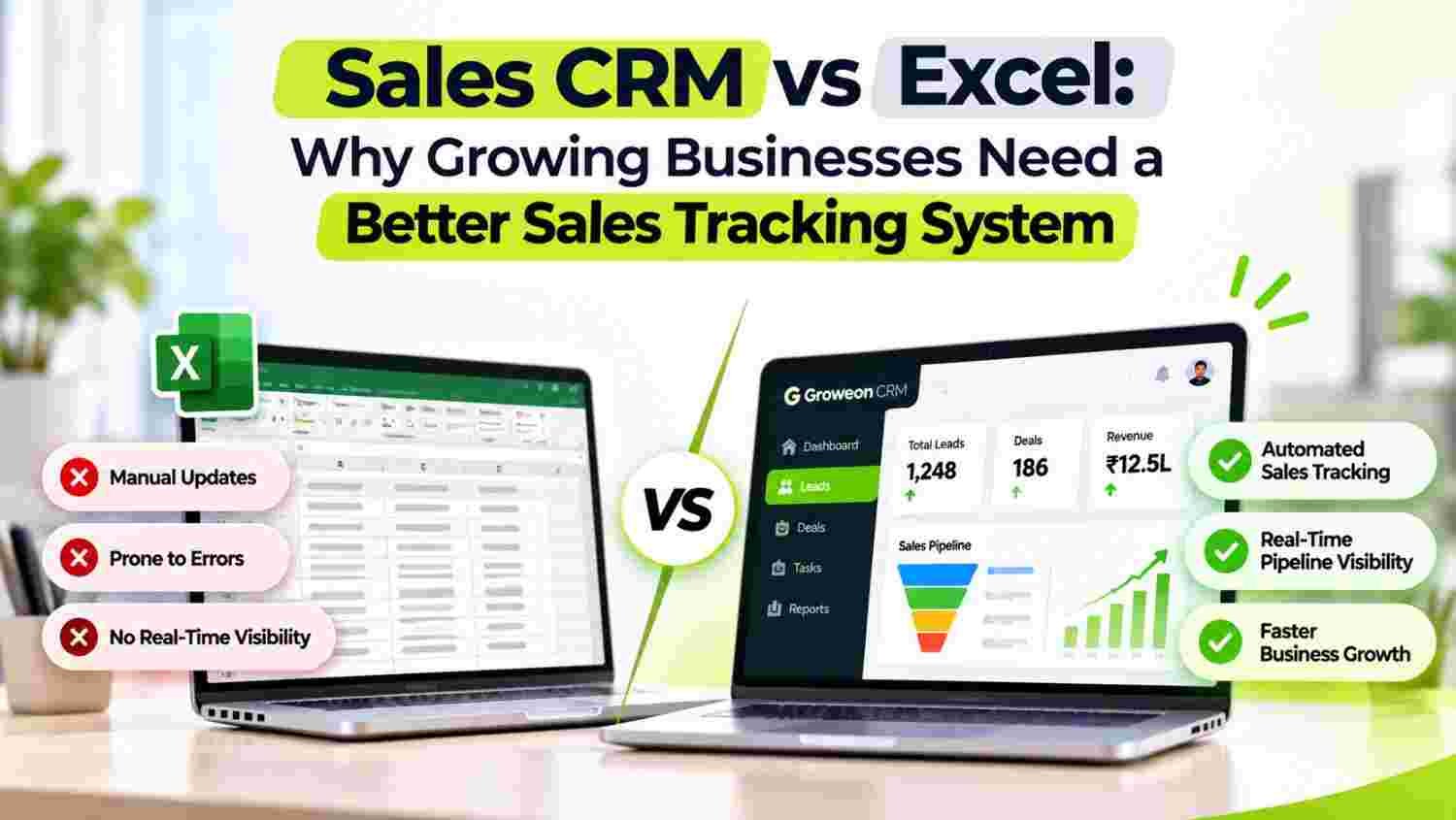
Excel may help businesses track sales initially, but managing growing leads, follow-ups and sales activities through spreadsheets becomes increasingly difficult.
Sales tracking software provides a structured way to monitor leads, sales pipelines, team activities and deal progress from one platform.
This guide compares Excel with sales CRM software and explains why growing businesses need automated sales tracking, better visibility and organised workflows.
Discover how the right sales tracking software can help businesses improve sales productivity, reduce missed opportunities and manage their sales operations more effectively.
Excel is one of the most commonly used tools for managing business information. Many small businesses start tracking sales through spreadsheets because they are familiar, flexible and easy to set up.
Initially, a simple spreadsheet may contain customer names, phone numbers, enquiry dates, deal values and follow-up dates. But as the business grows, the sales process becomes more complicated.
Consider a business receiving 200 enquiries every month. Multiple salespeople handle these enquiries, customers require repeated follow-ups, and managers need regular updates about deal progress.
Managing all this information through separate Excel files creates operational challenges.
Common problems include:
This is where sales tracking software becomes important. It helps businesses move from manually maintained spreadsheets to a connected sales management process.
Excel and sales CRM software can both store sales information, but they serve different operational requirements.
Excel is primarily a spreadsheet tool, whereas sales tracking software is designed to manage the complete sales workflow.
| Evaluation Area | Excel | Sales Tracking Software |
|---|---|---|
| Lead Management | Manual data entry | Organised lead records |
| Sales Pipeline | Manually maintained stages | Structured pipeline tracking |
| Follow-Up Management | Manual reminders | Automated reminders and activities |
| Lead Assignment | Manual sharing | Rule-based or organised assignment, depending on CRM |
| Team Tracking | Separate reports | Centralised activity visibility |
| Sales Reporting | Manual calculations | Automated dashboards and reports |
| Customer History | Multiple spreadsheet entries | Connected customer records |
| Data Updates | Manual updates | Centralised record updates |
| Sales Automation | Limited | Workflow automation |
| Management Visibility | Depends on spreadsheet accuracy | Centralised sales visibility |
The key difference is not simply where customer data is stored. It is how efficiently a business can manage, update and act on that information.
When businesses use Excel, customer information may be scattered across multiple files and employee devices.
A dedicated sales tracking system creates organised lead records that authorised team members can access.
Sales managers can monitor:
This reduces dependency on individual spreadsheets and makes lead management more structured.
A potential customer may enquire today but make a purchase decision after several conversations.
If the salesperson forgets to follow up, the opportunity may go cold.
Excel can store follow-up dates, but employees must regularly check the spreadsheet and remember to take action.
Sales tracking software helps organise follow-up activities through reminders, scheduled tasks and automated workflows, depending on the CRM’s capabilities.
This helps sales teams maintain consistent communication without relying entirely on memory.
A spreadsheet may show how many leads a business has received, but understanding where every opportunity stands can become difficult.
A sales pipeline gives managers a structured view of deal progress.
Typical pipeline stages include:
With sales tracking software, managers can identify opportunities that are progressing, delayed or waiting for the next action.
This makes sales pipeline management more transparent and organised.
Business owners need to understand what their sales teams are doing, not just how many deals they close.
However, collecting daily updates through calls, messages and spreadsheets creates additional administrative work.
Sales tracking software can provide visibility into important sales activities, such as:
Managers can use these insights to identify workload distribution, performance gaps and areas where employees may need support.
Preparing sales reports through Excel often requires collecting information from different employees and combining multiple spreadsheets.
This creates repetitive work and increases the possibility of outdated or inconsistent information.
A CRM-based sales tracking system can generate reports using available sales records and activity data.
Businesses can monitor:
Instead of spending hours preparing reports, managers can spend more time analysing results and improving sales processes.
When multiple employees maintain separate Excel sheets, the same customer may appear several times.
This can result in duplicate calls, inconsistent communication and confusion about lead ownership.
A centralised CRM helps businesses maintain organised customer records and identify duplicate information through available matching and data management features.
It also provides better visibility into assigned leads and their current status.
A sales process that works for two employees may not work efficiently for twenty.
As businesses expand, they need more structured ways to manage customer enquiries, sales activities, reporting and team coordination.
Sales tracking software provides a foundation for standardising these processes.
Businesses can introduce more advanced capabilities as their requirements grow, including automated lead assignment, sales workflows, integrations, AI assistance and management dashboards.
Not every CRM offers the same capabilities. Before choosing sales tracking software, businesses should evaluate the features that directly support their sales process.
| Feature | Why It Matters |
|---|---|
| Lead Management | Captures and organises customer enquiries |
| Sales Pipeline | Tracks opportunities through different stages |
| Follow-Up Automation | Helps maintain timely customer communication |
| Lead Assignment | Distributes enquiries among salespeople |
| Call and Activity Tracking | Maintains visibility into sales activities |
| Team Management | Helps managers monitor team responsibilities |
| Sales Reports | Provides insights into sales performance |
| Mobile CRM | Allows employees to access customer information anywhere |
| Integrations | Connects CRM with other business applications |
| AI Assistance | Supports lead analysis and sales productivity |
A business should prioritise features according to its team size, lead volume, sales cycle and operational requirements.
Groweon Sales CRM is designed to help businesses manage their sales activities through a more organised and connected system.
Instead of maintaining separate spreadsheets for leads, follow-ups and sales progress, businesses can manage important sales workflows through one CRM platform.
Key capabilities include:
Lead Management: Capture, organise, assign and track customer enquiries throughout the sales process.
Sales Pipeline Management: Monitor opportunities through different stages and understand where deals stand.
Follow-Up Management: Organise pending activities and help salespeople stay connected with prospects.
Sales Automation: Reduce repetitive manual activities through automated workflows and sales processes.
Team Tracking: Improve visibility into sales activities and individual employee responsibilities.
AI-Powered Sales Assistance: Use available AI capabilities such as lead scoring, lead analysis and smart suggestions to support sales decisions.
Call and Communication Management: Maintain better visibility into customer interactions through supported calling and communication integrations.
With these capabilities, businesses can move towards a more structured sales management process instead of depending entirely on manually updated spreadsheets.
Explore Groweon Sales CRM to understand how it can support your sales operations.
There is no fixed business size at which every company must switch to a CRM.
However, certain signs indicate that Excel may no longer be sufficient for managing sales activities.
Consider moving to sales tracking software when:
The objective is not to stop using Excel completely. Spreadsheets can still be useful for calculations, analysis and data exports. The objective is to use a dedicated CRM for managing ongoing customer relationships and sales workflows.
1. What is sales tracking software?
Sales tracking software is a business application that helps companies manage leads, monitor sales pipelines, organise follow-ups and track sales team activities. It provides a centralised view of sales opportunities and their progress.
2. Is sales tracking software better than Excel?
For managing an expanding sales operation, CRM-based sales tracking software generally provides more structured lead management, follow-up reminders, pipeline visibility, team coordination and reporting than manually maintained Excel spreadsheets.
3. Can small businesses use sales tracking software?
Yes. Small businesses can use sales tracking software to organise customer enquiries, manage sales activities and maintain consistent follow-ups. Many CRM providers offer plans suitable for smaller teams.
4. How does sales tracking software improve sales productivity?
It helps reduce manual data entry, organise customer information, schedule follow-ups, track opportunities and provide visibility into sales activities. This allows employees to spend more time engaging with prospects and managing deals.
5. What is the difference between sales CRM and sales tracking software?
Sales tracking software focuses on monitoring leads, sales activities and deal progress. Sales CRM generally covers a broader set of customer relationship management activities, including lead management, communication history, sales pipelines, automation and customer information.
6. Does sales tracking software help monitor employees?
Yes. Depending on the CRM features, managers can monitor assigned leads, calls, meetings, follow-ups, sales activities and deal conversions. This provides operational visibility without depending entirely on manual employee reports.
7. Can sales tracking software automate follow-ups?
Many CRM platforms support automated reminders, scheduled activities and workflow-based follow-ups. The exact level of automation depends on the provider and subscription plan.
8. How do I choose the right sales tracking software for my business?
Evaluate lead management, pipeline tracking, follow-up automation, team visibility, reporting, mobile access, integrations, security and pricing. Select a platform that fits your current workflow and can support future business requirements.
Excel can be a useful starting point for managing sales information, but growing businesses eventually need better visibility, coordination and control over their sales processes.
Managing leads, follow-ups, sales pipelines and team activities through separate spreadsheets can create unnecessary manual work and make it harder to identify opportunities.
Sales tracking software helps businesses organise these activities through a centralised system, making sales operations easier to monitor and manage.
If your business is still relying on Excel to track every enquiry and sales update, it may be time to explore a dedicated CRM.
Move beyond spreadsheets. Bring your leads, pipeline, follow-ups and sales team together with Groweon Sales CRM.
Explore Groweon Sales CRM and discover a more organised way to manage your sales process.

02 Nov, 2026
Field sales teams play an important role in businesses that...
02 Nov, 2026
Summary Excel may help businesses track sales initially, but managing...

31 Oct, 2026
Summary Lead Assignment Software helps businesses automatically distribute incoming leads...
31 Oct, 2026
Summary A free mobile CRM app helps small businesses manage...
31 Oct, 2026
Quick Summary Order Management CRM software connects customer information, sales...