

How to Choose CRM Software When Your Sales Team Has…
28 Oct, 2026
Quick Summary A multi-source CRM brings leads from Google Ads,...
Updated: 28th October, 2026
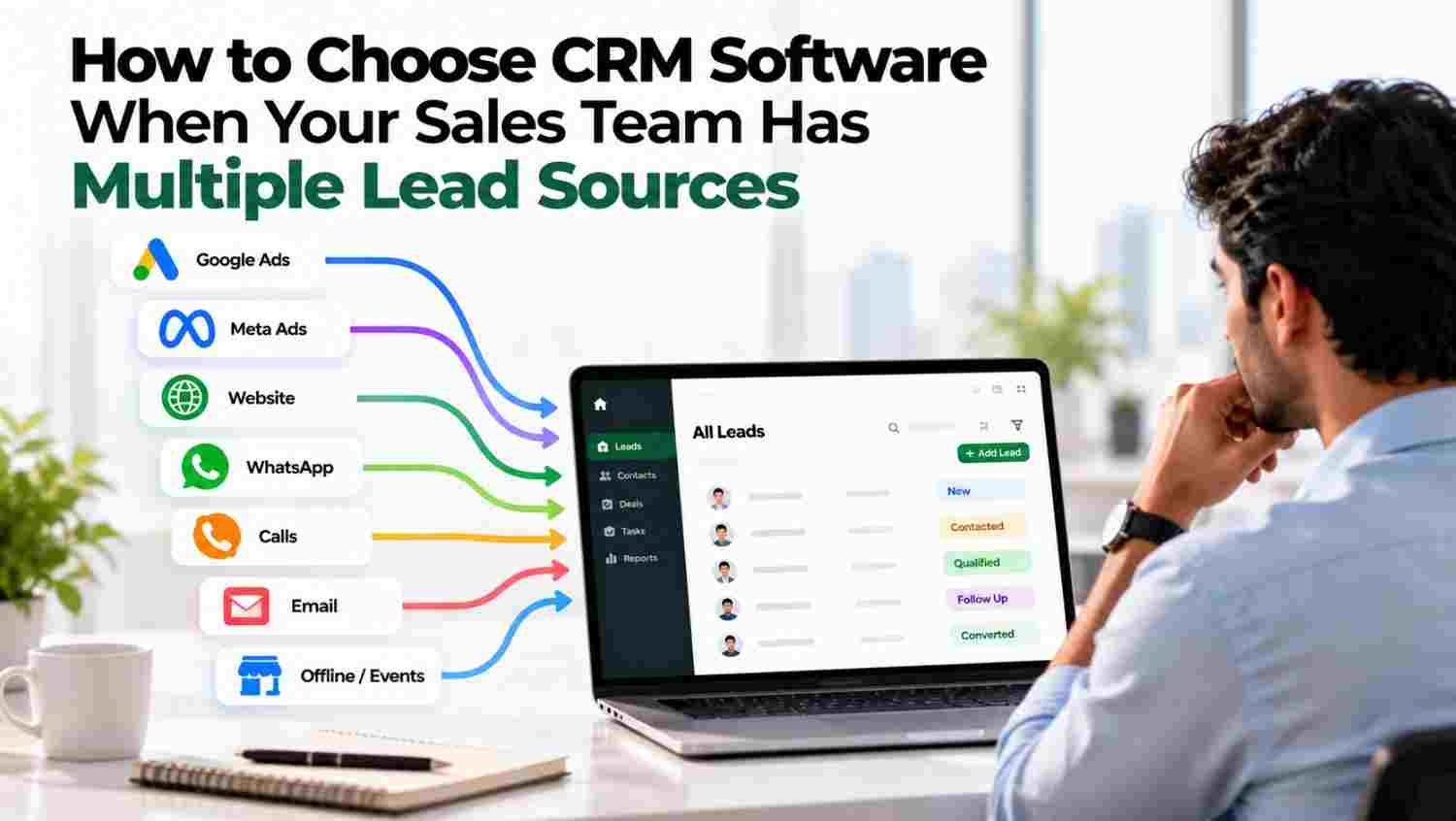
Most businesses do not generate enquiries from just one channel. A potential customer might fill out a website form, click a Facebook ad, send a WhatsApp message or contact a sales representative after finding the company on Google.
Each channel brings an opportunity, but managing these enquiries separately creates operational problems.
For example, marketing may track campaign leads in an advertising dashboard, website enquiries may arrive by email, and sales representatives may maintain customer details in personal spreadsheets. WhatsApp conversations may remain on individual phones.
The result is fragmented information. Managers cannot easily see which campaigns generate qualified buyers, representatives may contact the same prospect twice, and some enquiries receive no timely response.
CRM software helps solve this problem by bringing lead information and sales activity into a central system. Instead of treating every channel as a separate process, businesses can manage enquiries through one consistent workflow.
Start by listing all the channels your business currently uses to generate enquiries.
These may include:
Your CRM should support the integrations your business actually needs. Do not assume that every platform connects natively; confirm whether each connection requires an API, a third-party integration or a separate subscription.
Capturing a lead is only the beginning. Your team also needs to know where that enquiry originated.
A good CRM should record the original source, campaign information where available, date of enquiry and subsequent sales activity.
| Lead source | Information to track | Business benefit |
|---|---|---|
| Google Ads | Campaign, keyword or landing page where available | Compare paid campaign quality |
| Meta Ads | Campaign and ad form details | Evaluate lead generation performance |
| Website | Page, form and enquiry date | Identify high-interest pages |
| Contact details and conversation history | Maintain follow-up continuity | |
| Business portals | Portal name and enquiry details | Compare portal-generated opportunities |
| Referrals | Referrer and customer details | Measure referral contribution |
Accurate attribution depends on the data passed by each integration. A CRM cannot reliably identify a campaign if the original source information was never captured.
When leads arrive from several channels, manual distribution becomes difficult to manage.
Look for assignment rules based on territory, product, industry, team availability or other relevant criteria. These rules can help direct each enquiry to the appropriate representative.
For example, a company selling industrial machinery might assign enquiries about one product category to a specialist team while sending another category to a different team.
The CRM should also record ownership changes so managers can see who is responsible for each lead.
Leads often go cold because representatives become busy with existing customers, meetings or quotations.
Choose a CRM that supports reminders, follow-up schedules, task creation and workflow automation. Depending on the platform, it may also support automatic emails, WhatsApp messages or AI-led calling.
For instance, a new website enquiry could trigger an acknowledgement, create a task for the assigned representative and alert a manager if the enquiry remains untouched.
Automation should follow your business rules and customer communication preferences.
A buyer may click an advertisement and later contact your business through WhatsApp. Without duplicate detection, the CRM could create two separate records for the same person.
Look for matching rules based on phone number, email address or other suitable identifiers. Check whether the system can merge duplicates while preserving useful source and interaction history.
A unified record helps sales representatives understand previous conversations before contacting the customer again.
Your CRM should help answer questions beyond how many leads arrived.
Useful reports include:
These reports help marketing and sales teams evaluate lead quality together.
For example, a campaign producing 500 leads may appear successful until the team discovers that only a small number progress to demonstrations. A smaller campaign may generate fewer leads but more qualified opportunities.
Before purchasing, confirm that the CRM supports your existing website, communication channels and reporting requirements. Review user permissions, data export options, backup practices, security controls and vendor support.
Also consider how the system will perform as your business grows. A solution suitable for five sales representatives should not become difficult to manage when the team expands to twenty or fifty.
| Capability | Traditional CRM | AI-enabled CRM |
|---|---|---|
| Lead capture | Manual entry or connected forms | Connected capture with supported automation |
| Lead qualification | Primarily handled by sales representatives | AI can ask qualifying questions and assess intent |
| Follow-ups | Reminders and scheduled workflows | May support AI-led calls or conversational follow-ups |
| Lead prioritisation | Filters and manually assigned scores | May use AI-assisted scoring |
| Reporting | Dashboards and standard reports | Can add summaries and AI-assisted insights |
Capabilities vary by product and plan, so verify them during a demo.
Groweon CRM supports centralised lead and sales management. Businesses can also explore AION Autopilot for AI-driven lead engagement and qualification workflows, subject to the capabilities available in their selected setup.
Imagine a B2B company receives 300 enquiries every month from Google Ads, Meta Ads, its website, WhatsApp and a business portal.
Without a central CRM, the marketing team may report total enquiries while sales managers struggle to determine how many were contacted, qualified or converted.
With a properly configured CRM, each lead enters a shared pipeline, receives an owner, and follows a defined process. Managers can compare performance by source and identify where leads are being lost.
The company can then improve its process based on evidence rather than relying only on the total number of enquiries.
Use this checklist during vendor demonstrations:
Ask the vendor to demonstrate your actual sales process rather than showing only a standard product tour.
For further guidance, review the NIST Cybersecurity Framework for general security risk-management principles, the Google Analytics documentation for campaign measurement, the Meta Business Help Center for advertising lead workflows, and the Google Ads Help Center for campaign tracking.
What is the best CRM for managing leads from multiple sources?
The best CRM is the one that supports your important lead channels, maintains reliable source data, automates your sales process and provides useful reporting. Evaluate products against your own workflow instead of choosing solely by brand popularity.
Can a CRM capture leads from Google Ads and Meta Ads?
Yes, many CRM platforms support lead capture through native integrations, APIs or third-party connectors. Confirm the integration method and which campaign fields are passed to the CRM.
Why is lead source tracking important?
It helps businesses understand which channels generate qualified opportunities and customers, allowing marketing budgets and sales resources to be allocated more effectively.
Does AI CRM eliminate the need for sales representatives?
No. AI can assist with initial responses, qualification and routine follow-ups, while sales representatives handle complex questions, negotiations and relationship building.
How should a small business start?
Begin with the channels that generate most of your enquiries. Configure source tracking, lead assignment and follow-up reminders first, then add more advanced automation as your process matures.
When leads arrive from multiple sources, the challenge is not simply collecting enquiries. It is ensuring every lead is recorded correctly, assigned to the right person, followed up on time and measured through the sales pipeline.
Choose CRM software that connects your important channels, preserves source information, supports automation and gives managers a reliable view of conversions.
For businesses seeking connected sales workflows and AI-assisted lead engagement, Groweon CRM is one option to evaluate against these requirements.
28 Oct, 2026
Quick Summary A multi-source CRM brings leads from Google Ads,...

28 Oct, 2026
Education CRM in India: A Smarter Way to Manage Admissions...

27 Oct, 2026
Summary CRM Software helps businesses manage customer data, sales pipelines,...

27 Oct, 2026
Summary Track leads from Google Ads, Meta Ads, websites and...

27 Oct, 2026
Summary AI CRM combines customer relationship management with artificial intelligence...