

Lead Management Software vs CRM: Which Does Your Team Need?
08 Oct, 2026
Summary The lead management software vs CRM choice comes down...
Updated: 8th October, 2026
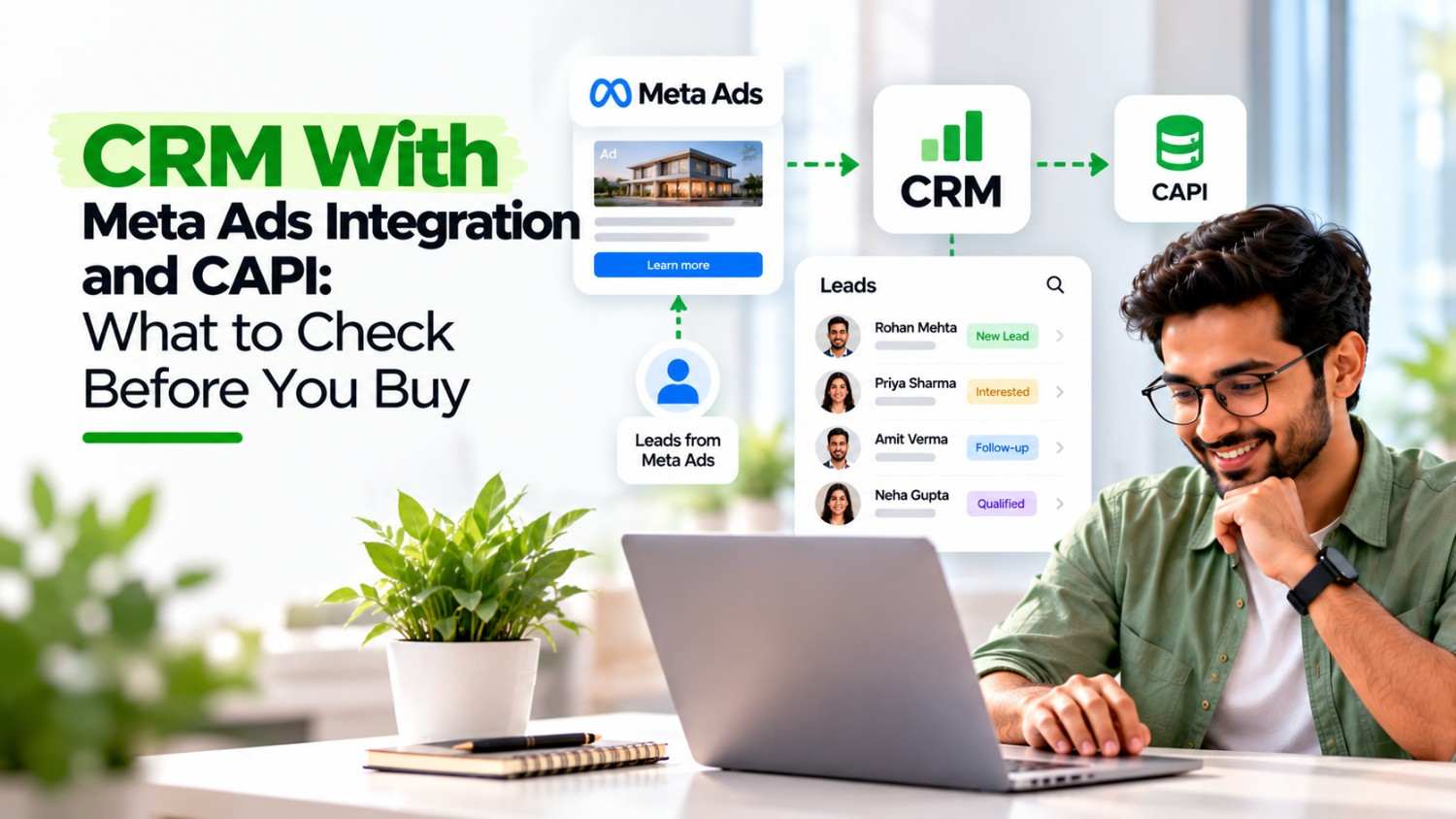
A CRM with Meta Ads integration should do two jobs: capture leads in seconds and send quality signals back to Meta. First, check lead ID storage, stage mapping, and event logs. Then test the setup with a small budget. Finally, review cost per qualified lead every week. To see how chat-based follow-up fits in, read our WhatsApp CRM buying guide.
Most Indian businesses run Meta lead ads and then lose track of what happens next. A CRM with Meta Ads integration fixes the first half of that problem by pulling leads in instantly. A CRM that also supports the Conversions API (CAPI) fixes the second half, because it tells Meta which leads turned into real sales. As a result, your campaigns learn from revenue instead of form fills.
This guide explains how the connection works, what to verify before you buy, and where setups usually fail. It focuses on lead generation businesses such as real estate, education, finance, and services, where the sale happens after the form.
Meta optimizes for the result you give it. If you optimize for form submissions, the system finds people who fill forms. However, those people are not always the ones who answer calls or buy.
Consider two ad sets with similar lead counts. One may produce buyers while the other produces curious browsers. Without feedback from the CRM, both look equally healthy in Ads Manager. Therefore, you keep paying for the weaker audience.
Offline conversion tracking closes that gap. According to a guide to Meta offline conversion tracking, these events show what happened after the visible digital interaction, which browser signals cannot see.
The connection has two directions. Each one solves a different problem.
When someone submits an Instant Form, the lead should appear in your CRM within seconds, with the campaign, ad set, and ad details attached. In addition, the CRM should assign the lead to a rep right away. Speed matters because the first team to call usually wins the conversation.
This is where CAPI comes in. When a rep marks a lead as qualified, visited, or won, the CRM sends that status to Meta as a conversion event. A Meta developer guide for CRM webhooks explains that these status changes enable the Conversion Leads optimization for lead ads.
Meta has also reported gains from this approach. As summarized in a lead ads CAPI overview, Meta says it can lower the cost per quality lead by 15% and raise lead conversion by 44% compared with volume-optimized lead ads. Treat these as Meta’s own figures, and expect your results to vary.
Many CRMs say they integrate with Meta. The details decide whether a CRM with Meta Ads integration actually helps you. Ask vendors about each point below.
You can build a CRM with Meta Ads integration in several ways. Each suits a different team.
For most small and mid-sized teams, native support is the best starting point. Choose a bridge tool only when the CRM you prefer lacks it.
A CRM with Meta Ads integration gives Meta better signals, but your team still has to act on the leads. First, call or message new leads quickly. Then keep stages accurate, because those updates feed Meta. For follow-up messages, our guide to WhatsApp follow-ups for Indian leads shows how lean teams reply faster.
Also review results by campaign every week. Look at cost per qualified lead and cost per site visit or sale, not just cost per lead. This view shows which ad sets deserve more budget, and it is the main payoff of a CRM with Meta Ads integration.
If you run very few ads and a CRM with Meta Ads integration feels like overkill, or if you close most deals within a day, simple lead capture may be enough. Likewise, if you have fewer than a few dozen leads a month, Meta may not receive enough events to learn from them. Start with fast lead capture and clean stages. Then add CAPI as your volume grows.
What is a CRM with Meta Ads integration?
It is a CRM that connects to Meta lead ads, so new leads arrive automatically with campaign details. Better versions also send lead status updates back to Meta through the Conversions API.
What does CAPI do for lead ads?
CAPI lets your CRM tell Meta which leads became qualified or paying customers. Meta can then optimize toward people who resemble your best leads instead of all form fillers.
Do I need a developer to set up CAPI?
Not always. Some CRMs offer native setup, and middleware tools cover others. Custom builds need a developer, so ask vendors which route they support.
Which events should I send to Meta?
Send the raw lead and the stages that signal intent, such as qualified, site visit, or booked. Avoid sending only the final sale, because it arrives too late and too rarely for Meta to learn from.
How do I know the integration works?
Check the event log in your CRM and the dataset in Meta Events Manager. Confirm that events arrive with matching lead IDs, and test with a few sample leads before you scale spend.
08 Oct, 2026
Summary The lead management software vs CRM choice comes down...

08 Oct, 2026
Summary (TL;DR) A CRM with Meta Ads integration should do...

07 Oct, 2026
Summary (TL;DR): A free mobile CRM can replace messy notebooks...

07 Oct, 2026
Summary A mobile CRM for real estate agents keeps every...

07 Oct, 2026
Summary A WhatsApp CRM app gives small sales teams in...