

Best FMCG CRM Software in India for Sales & Distributor…
03 Sep, 2026
Summary The right FMCG CRM Software can help FMCG businesses...
Updated: 28th March, 2026
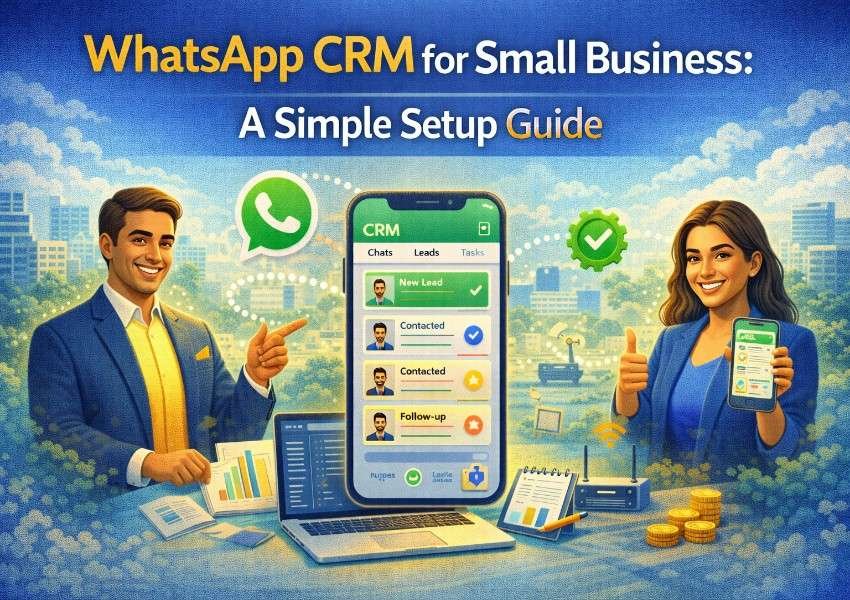
If you run a small business in India, there is a good chance your customers are already messaging you on WhatsApp. Enquiries come in, you reply when you can, deals get discussed across dozens of threads, and somewhere in that chaos, leads go cold and follow-ups get missed.
A WhatsApp CRM for small business fixes this. It connects your WhatsApp to a CRM so every conversation is tracked, every lead is logged, and every follow-up happens on time, automatically, without your team having to manage it all manually.
This guide walks you through what a WhatsApp CRM for small business is, why it matters, and how to set one up step by step.
A WhatsApp CRM for small business is a CRM platform integrated directly with WhatsApp Business, allowing your team to manage all customer conversations from inside the CRM alongside your pipeline and lead records.
Instead of conversations scattered across personal phones or a shared WhatsApp app that nobody really owns, every message lives in the CRM. It is searchable, assignable, and connected to the relevant contact and deal record. Every team member has full context. No lead gets lost in a thread.
Small businesses operate with limited headcount and limited time. Every missed follow-up is a direct cost. WhatsApp CRM for small business reduces both by bringing structure to the channel where most customer communication already happens.
According to Meta’s WhatsApp Business data, over 175 million people message a WhatsApp Business account every day globally. In India, WhatsApp is the default channel for the vast majority of customer and business interactions. If your sales conversations are happening on WhatsApp but your CRM does not know about them, you are managing half your pipeline blind.
A WhatsApp CRM gives you full visibility. Every message is logged. Every lead is tracked. And your team can respond fast, stay organized, and build the consistent communication that converts prospects into customers.
If you are using a personal number for business, create a dedicated WhatsApp Business account first. This gives you access to business features like automated greeting messages, quick replies, and a professional business profile.
The standard WhatsApp Business app does not integrate with CRM platforms. For a true WhatsApp CRM for small business you need the WhatsApp Business API, which supports multiple users, automated messages, and CRM integration. Most CRM providers including Groweon CRM handle the API setup for you so no technical expertise is required.
Your API account needs a number not already registered to a personal WhatsApp account. This is typically a business SIM or virtual number.
WhatsApp requires that you only send automated messages to contacts who have opted in. Set up a simple opt-in mechanism on your contact form or website before automating outreach.
Select a CRM with native WhatsApp Business API integration. Look for a shared team inbox, automated message workflows, conversation logging against contact records, and mobile access. Groweon CRM includes all of these in a single platform built for small and growing businesses, with guided WhatsApp onboarding that requires no developer involvement.
Connect your WhatsApp Business number through the CRM’s integration settings. With Groweon CRM this is a guided process covering number verification and API activation without any code. Once connected, incoming messages appear in your shared CRM inbox and outgoing messages are sent from within the platform.
Configure your inbox so incoming WhatsApp messages are visible to the right people and automatically assigned to the right rep based on enquiry type, product, or location. In Groweon CRM, assignment rules route new WhatsApp leads to the correct team member the moment they message you.
WhatsApp requires pre-approved templates for automated outbound messages. Submit your templates through the CRM for Meta approval, which typically takes 24 to 48 hours.
Start with four core templates. A welcome message sent instantly when a new lead contacts you. A follow-up message sent 24 hours after a sales conversation with no reply. An appointment reminder sent the day before a scheduled call. A re-engagement message sent after five days of silence.
Set up your first workflow inside the CRM. When a new lead sends a WhatsApp message, the system should automatically send the welcome template, create a contact record, assign the lead to a rep, and create a follow-up task.
This single workflow ensures every WhatsApp enquiry is captured, acknowledged, and actioned without manual effort. For small businesses handling dozens of enquiries a week, this automation prevents leads from falling through the cracks consistently.
Configure your CRM so that WhatsApp messages are triggered automatically as deals move through pipeline stages. When a deal moves to Proposal Sent, an automatic message asks if the prospect has questions. When it goes quiet for five days, a check-in message fires. And when deal closes, a welcome message goes to the new customer.
Pipeline-triggered messaging keeps deals moving without your reps having to remember every touchpoint manually.
Run a short session covering how to manage conversations in the shared inbox, when to use templates versus personal replies, and how to log notes against a conversation for context. The goal is confidence that the system handles routine touchpoints so the team can focus on conversations that need a human response.
Use your welcome automation to acknowledge every new message instantly and set rep notifications so personal follow-ups happen promptly during business hours.
WhatsApp is a personal channel. Concise, friendly messages with one clear call to action outperform long formal templates every time.
Thirty seconds of context review before responding makes every message more relevant and builds the trust that converts leads into customers.
Define the moments where a rep should step in personally and make those handoffs clear and prompt. Over-automation makes customers feel like they are talking to a bot.
Track response rates, opt-out rates, and WhatsApp-to-conversion rates. Small adjustments based on real data compound into significantly better results over time.
Groweon CRM is built to make WhatsApp CRM for small business genuinely accessible without technical complexity or an enterprise budget.
You get a guided WhatsApp Business API setup, a shared team inbox where conversations are organized and assignable, pre-built templates for common sales and support scenarios, automated workflows triggered by pipeline stage and lead behavior, full conversation history connected to every contact record, and real-time dashboards showing response rates and conversion metrics.
For small businesses that want WhatsApp to be a structured, automated sales channel rather than a chaotic collection of personal threads, Groweon CRM makes it possible from day one.
Book a free 20-minute Groweon CRM demo and we will walk you through the WhatsApp setup live.
WhatsApp is not a side channel for small businesses in India. It is the primary channel. Managing it through personal phones and unstructured threads is costing small businesses leads, deals, and customers every day.
A WhatsApp CRM for small business brings the structure and automation that turns your most active communication channel into your most effective sales tool. The setup is simpler than most business owners expect and the impact is immediate.
Groweon CRM gives you everything you need to get started today. Professional WhatsApp sales management, accessible to every small business regardless of team size or technical capability.
Book your free 20-minute demo today and get your WhatsApp CRM set up faster than you think.
Q1. What is a WhatsApp CRM for small business?
It is a CRM platform connected to WhatsApp Business that lets your team manage all customer conversations, track leads, and automate follow-ups from one place instead of across multiple personal phones.
Q2. Do I need technical skills to set up WhatsApp CRM?
No. Platforms like Groweon CRM handle the WhatsApp Business API connection with a guided, no-code setup that any business owner can complete without technical help.
Q3. Can multiple team members use the same WhatsApp number in a CRM?
Yes. A shared inbox lets multiple reps view, respond to, and assign WhatsApp conversations from the same business number without conflicts or missed messages.
Q4. Is WhatsApp CRM affordable for small businesses?
Yes. Groweon CRM is priced specifically for growing and small businesses, making WhatsApp CRM accessible without enterprise-level costs.
Q5. What is the first automation to set up in a WhatsApp CRM?
An instant welcome message triggered when a new lead messages your number. It acknowledges the enquiry immediately, captures the lead in the CRM, and notifies the rep to follow up personally.
[wpforms id=”535″]
03 Sep, 2026
Summary The right FMCG CRM Software can help FMCG businesses...

03 Sep, 2026
Summary AI CRM in India is becoming an important part...

02 Sep, 2026
Summary AI is transforming CRM from a system that stores...

02 Sep, 2026
Summary CRM data becomes useful only when supported by a...

01 Sep, 2026
Summary AI CRM software in India is transforming lead management,...