

Best FMCG CRM Software in India for Sales & Distributor…
03 Sep, 2026
Summary The right FMCG CRM Software can help FMCG businesses...
Updated: 28th February, 2026
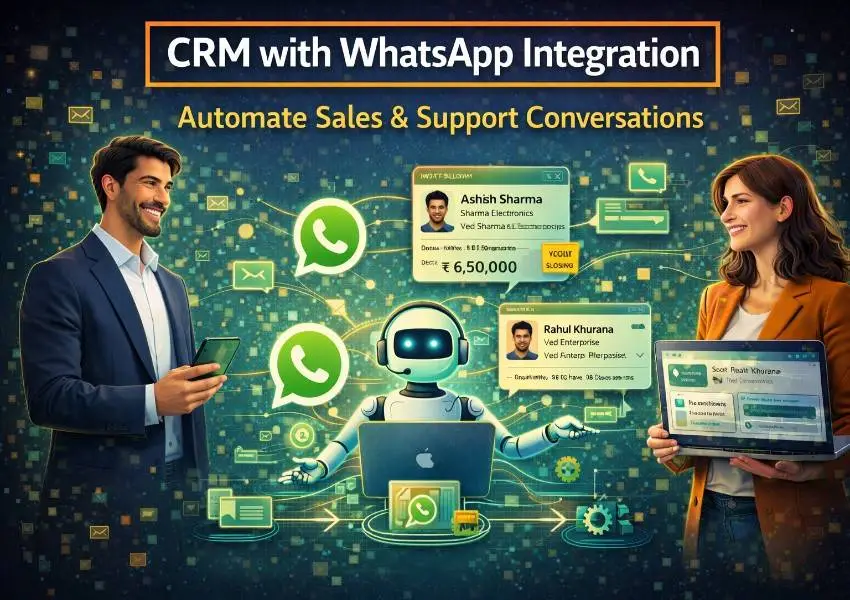
Your customers are already on WhatsApp. With over 2 billion active users worldwide, WhatsApp is where people have real conversations, make quick decisions, and expect fast responses. Yet most businesses are still managing their sales and support through email threads, cold calls, and contact forms that prospects barely fill out anymore.
A WhatsApp CRM changes that entirely. By connecting WhatsApp directly to your CRM, you bring your customer conversations into the same system where your pipeline, lead data, and sales workflows live.
All messages are tracked. Conversations are logged. Follow-ups are automated. And your team responds faster, sells smarter, and supports better without working harder.
This guide covers everything you need to know about WhatsApp CRM: what it is, how it works, why it matters for sales and support, and how to use it to automate conversations that convert.
A WhatsApp CRM is a CRM platform that integrates directly with WhatsApp Business API, allowing your sales and support teams to send, receive, and manage WhatsApp conversations from inside the CRM itself. Instead of switching between WhatsApp on a phone and your CRM on a desktop, everything lives in one place.
With a WhatsApp CRM, every message a prospect or customer sends on WhatsApp is automatically linked to their contact record in the CRM. Your team sees the full conversation history alongside the lead’s pipeline stage, previous interactions, deal value, and any notes from earlier touchpoints. This context makes every response faster, more relevant, and more personal.
More importantly, a WhatsApp CRM lets you automate. You can set up automated welcome messages when a new lead reaches out, trigger follow-up sequences based on pipeline stage, send appointment reminders, deliver proposals, and resolve support queries, all through WhatsApp, all without your team having to manually send each message.
Groweon CRM’s WhatsApp integration brings all of this together in a single platform built for growing sales and support teams, making it one of the most practical WhatsApp CRM solutions available for businesses that are serious about customer communication.
Email open rates average around 20%. WhatsApp message open rates average around 98%. That number alone tells you everything about where customer attention has shifted.
Buyers today expect communication to happen on their terms, in their preferred channel, at the pace they are comfortable with. For the majority of customers globally, especially across Asia, the Middle East, Latin America, and increasingly Europe, that channel is WhatsApp.
Beyond open rates, WhatsApp conversations feel more natural and low-pressure than email or phone. Prospects are more likely to ask questions, share their concerns, and engage in a dialogue that moves them closer to a decision. Support queries get resolved faster because back-and-forth messaging is instant rather than waiting on email replies.
For sales teams, this means shorter sales cycles. For support teams, this means higher satisfaction scores. And for businesses using a WhatsApp CRM, it means all of that activity is organized, tracked, and feeding directly into the same system that manages their pipeline and customer data.
Centralized conversation management. Without a WhatsApp CRM, WhatsApp messages live on individual phones or a shared business device that nobody really owns. Conversations get missed. Context is lost when a rep changes. Managers have no visibility. A WhatsApp CRM puts every conversation in a shared, searchable, organized inbox connected to your CRM data.
Faster response times. Speed is everything in sales and support. A WhatsApp CRM lets you set up instant automated responses when a lead first messages you, so no inquiry ever sits unanswered for hours. Automated replies acknowledge the message, set expectations, and can even qualify the lead before a rep steps in.
Full conversation history in context. When a rep picks up a WhatsApp conversation in your CRM, they see not just the messages but also the lead’s pipeline stage, deal value, previous call notes, and email history. This context means they never have to ask a prospect to repeat themselves, which builds trust and speeds up the sale.
Automated follow-up sequences. A WhatsApp CRM lets you build message sequences that trigger based on lead behavior or pipeline stage. A prospect who requests a demo gets an automatic WhatsApp confirmation followed by a reminder the day before. A lead who goes quiet after a proposal receives a gentle check-in after 48 hours. These sequences run automatically, keeping deals moving without rep intervention.
Team collaboration on conversations. In a WhatsApp CRM, multiple team members can view and contribute to the same conversation without confusion. Internal notes can be added to a thread without the customer seeing them. Conversations can be assigned from one rep to another with full context preserved.
Compliance and record keeping. Every WhatsApp conversation logged in your CRM creates an automatic audit trail. This is valuable for compliance, quality assurance, training, and dispute resolution. Nothing is lost because a rep left the company or forgot to update a record.
For sales teams, a WhatsApp CRM transforms prospecting, follow-up, and closing into a faster, more conversational process.
Lead capture via WhatsApp. When a prospect scans a WhatsApp QR code on your website, clicks a WhatsApp link in an ad, or messages your business number directly, they are automatically created as a lead in your CRM. Their WhatsApp number is linked to their contact record, and the conversation begins immediately, with an automated welcome message that introduces your team and asks what they are looking for.
Qualifying leads over WhatsApp. Rather than waiting for a prospect to fill out a form or take a call, your WhatsApp CRM can run qualification through a structured message sequence. A series of automated questions covering their need, timeline, and budget can pre-qualify leads before a rep ever steps in, saving time and ensuring reps focus on the highest potential opportunities.
Sending proposals and collateral. WhatsApp is an excellent channel for sharing documents, brochures, product videos, pricing sheets, and proposals. In a WhatsApp CRM, reps can send these materials directly from within the CRM with one click, and the system logs when the document was sent and whether it was viewed.
Pipeline-triggered messaging. As deals move through your pipeline, your WhatsApp CRM can automatically trigger messages at each stage. A deal advancing to “Proposal Sent” can trigger an automatic WhatsApp message asking if the prospect has any questions. A deal that has been stagnant for five days can trigger a check-in message from the assigned rep. This keeps deals moving without requiring reps to manually track and initiate every touchpoint.
Closing conversations. WhatsApp’s informal, conversational nature makes it an effective channel for nudging deals across the line. A quick message asking whether the prospect is ready to move forward often gets a faster response than a formal email. A WhatsApp CRM lets reps send these messages from within the pipeline view, keeping the close action connected to the deal record.
Customer support is where WhatsApp CRM delivers some of its most immediate impact. Customers already prefer messaging over calling. Giving them a fast, organized WhatsApp support experience builds loyalty and reduces churn.
Shared team inbox. A WhatsApp CRM gives your support team a shared inbox where every incoming WhatsApp message appears, can be assigned to the right agent, and is tracked through to resolution. No message gets missed because it landed on someone’s personal phone.
Automated responses for common queries. A large proportion of support queries are variations of the same questions: order status, pricing, product features, returns policy. A WhatsApp CRM lets you build automated responses to these common queries so customers get instant answers without waiting for an available agent. More complex issues are escalated to a human automatically.
Support history in one place. When a customer contacts support over WhatsApp, the agent sees not just the current message but the customer’s full history: previous support interactions, their purchase record, their plan or product, and any open deals in the pipeline. This context makes every support interaction faster and more relevant.
Proactive support messaging. A WhatsApp CRM lets your support team send proactive messages rather than just reacting to inbound queries. Sending a WhatsApp message to check in after a product delivery, notifying customers of a service update, or sending a payment reminder are all simple automations that reduce inbound support volume and improve the customer experience.
Getting started with a WhatsApp CRM requires access to the WhatsApp Business API, which is different from the standard WhatsApp Business app. The API is what enables integration with CRM platforms and supports automation, multiple users, and programmatic messaging.
Here is what the setup process typically looks like.
Step 1: Get access to WhatsApp Business API. This requires verification of your business through Meta’s platform. Most CRM providers, including Groweon CRM, guide you through this process and manage the technical setup on your behalf.
Step 2: Connect WhatsApp to your CRM. Once API access is established, your WhatsApp number is connected to your CRM. Incoming messages flow into the CRM inbox, and outgoing messages can be sent from within the CRM.
Step 3: Set up message templates. WhatsApp requires pre-approved message templates for outbound automated messages. These templates are submitted to Meta for approval and typically include your welcome messages, follow-up sequences, appointment reminders, and support replies.
Step 4: Build your automation workflows. Define which actions in your CRM should trigger WhatsApp messages. New lead created, deal stage changed, appointment confirmed, proposal sent, or support ticket opened are all common triggers.
Step 5: Train your team. Ensure your sales and support reps understand how to manage conversations within the CRM inbox, how to use templates, when to respond manually versus let automation handle it, and how to log notes against conversations.
Groweon CRM simplifies the entire setup process with guided onboarding for WhatsApp Business API connection, pre-built message templates for common scenarios, and visual workflow builders that require no technical knowledge to configure.
The following are real-world automation scenarios that businesses implement using a WhatsApp CRM to save time and improve results.
Instant lead response. A prospect clicks a WhatsApp link on your website. Within seconds, an automated message greets them by name, thanks them for reaching out, and asks a qualifying question. The lead is simultaneously created in the CRM and assigned to a rep, who is notified to follow up within the hour.
Demo confirmation and reminder. When a lead books a demo, an automated WhatsApp message confirms the date, time, and dial-in details immediately. A reminder is sent the morning of the demo. A follow-up is sent two hours after if the rep has not already logged the outcome.
Proposal follow-up. A rep sends a proposal. If the prospect has not responded within 48 hours, an automated WhatsApp message goes out: “Hi [Name], just checking in to see if you had a chance to review the proposal. Happy to answer any questions.” Simple, timely, and effective.
Re-engagement of cold leads. Leads that have been inactive for 30 days are automatically sent a WhatsApp message with a relevant piece of content or a new offer. Those who respond are moved back into the active pipeline. Those who do not are marked for long-term nurture.
Post-sale check-in. Three days after a deal closes, an automated WhatsApp message from the account rep asks if the customer has everything they need to get started. This simple touch significantly improves early retention and sets the tone for the customer relationship.
Support ticket updates. When a support ticket status changes, the customer receives an automatic WhatsApp update. No need to log into a portal or wait for an email. They get notified instantly on the channel they use most.
Like any part of your sales and support process, your WhatsApp CRM performance should be measured and optimized over time.
Message response rate tracks what percentage of your outbound WhatsApp messages receive a reply. A low response rate on automated sequences suggests your messaging needs to be more relevant or better timed.
Lead-to-conversation rate measures how many new leads initiate or respond to a WhatsApp conversation. A high rate indicates your WhatsApp entry points (QR codes, click-to-chat links, ad integrations) are working well.
Conversation-to-close rate measures how many WhatsApp conversations result in a closed deal. This is the ultimate measure of whether your WhatsApp CRM is contributing to revenue.
First response time measures how quickly a customer or lead receives a response after sending a message. With automation, this should be near-instant. For manual responses, set internal benchmarks and track against them.
Support resolution time measures how long it takes to resolve a customer query that arrives via WhatsApp. A WhatsApp CRM with automation and shared inbox tools should reduce this significantly compared to email-based support.
Groweon CRM is designed to make WhatsApp a core part of your sales and support operation, not a disconnected side channel that nobody manages properly.
With Groweon CRM’s WhatsApp integration, your team gets a unified inbox where every WhatsApp conversation is connected to the relevant contact and deal record, automated message sequences that trigger based on pipeline stage and lead behavior, pre-built templates for sales follow-up, appointment management, and support responses, real-time notifications when leads message you so response times stay sharp, team assignment and internal notes so multiple reps can collaborate on complex conversations, and performance dashboards that show conversation volumes, response times, and conversion rates.
For businesses that want to meet their customers where they are and turn every WhatsApp conversation into a sales or support win, Groweon CRM delivers the complete WhatsApp CRM solution.
Over-automating. Automation handles the routine touchpoints beautifully, but customers can tell when every message is templated. Use automation for the predictable moments and train your reps to step in with personalized messages when the conversation calls for a human touch.
Using WhatsApp as a broadcast channel. WhatsApp is a conversation platform, not an email newsletter. Sending mass promotional messages without context or relevance will get you blocked and damage your reputation. Keep WhatsApp communication personal and permission-based.
Ignoring opt-in requirements. You can only message customers on WhatsApp if they have opted in to receive messages from you. Your WhatsApp CRM should track opt-in status and suppress contacts who have not consented.
Not connecting WhatsApp to your pipeline. If WhatsApp conversations are happening outside your CRM, they are invisible to your sales process. The entire value of a WhatsApp CRM comes from having conversations and pipeline data in the same place.
Skipping performance measurement. WhatsApp feels informal, which can make teams less disciplined about tracking results. Measure response rates, conversion rates, and resolution times with the same rigor you apply to email and phone.
WhatsApp is where your customers are. A WhatsApp CRM is how you meet them there without losing the structure, visibility, and automation that makes your sales and support operation scalable.
When every conversation is tracked, every follow-up is automated, and every rep has full context before they respond, WhatsApp stops being a messaging app and starts being your highest-converting sales and support channel.
Groweon CRM gives you the complete WhatsApp CRM infrastructure to make that happen. Connect your WhatsApp Business account, set up your automations, and start turning conversations into customers today.
Q1. What is a WhatsApp CRM?
A WhatsApp CRM connects your WhatsApp Business account directly to your CRM so every conversation is tracked, logged, and linked to the right contact and deal. Your team manages all WhatsApp messages from inside the CRM without switching apps.
Q2. How does WhatsApp CRM help sales teams?
It lets reps engage leads on their preferred channel, automate follow-ups based on pipeline stage, send proposals and collateral directly via WhatsApp, and see the full conversation history alongside deal data, all from one screen.
Q3. Can WhatsApp CRM be used for customer support?
Yes. A shared inbox routes incoming WhatsApp messages to the right agent, automated replies handle common queries instantly, and agents see the customer’s full history before responding. It makes support faster and more personal.
Q4. Do I need WhatsApp Business API for a WhatsApp CRM?
Yes. The standard WhatsApp Business app does not support CRM integration or automation. The WhatsApp Business API is required, and most CRM providers like Groweon CRM handle the setup and API connection for you.
Q5. Is it possible to automate WhatsApp messages without losing the personal feel?
Absolutely. The key is using your CRM data to personalize automated messages with the prospect’s name, company, and specific context. Automation handles timing and consistency while personalization keeps it relevant.
[wpforms id=”535″]
03 Sep, 2026
Summary The right FMCG CRM Software can help FMCG businesses...

03 Sep, 2026
Summary AI CRM in India is becoming an important part...

02 Sep, 2026
Summary AI is transforming CRM from a system that stores...

02 Sep, 2026
Summary CRM data becomes useful only when supported by a...

01 Sep, 2026
Summary AI CRM software in India is transforming lead management,...